- Registrado
- 9 Oct 2023
- Mensajes
- 678
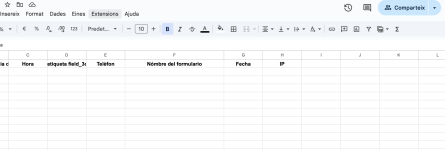
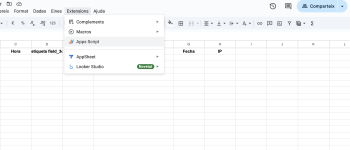
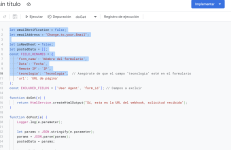
Aquí os dejo un código que os puede ser de mucha ayuda a la hora de recopilar datos de forma gratuita y sin plugin. Debéis crear un formulario de Elementor con los campos que necesites, una vez creado os vais a Google Sheet y creáis uno nuevo, una vez dentro, entrais en el apartado "Extensiones" y despues a "App-Script" y una vez dentro pegais el código siguiente:
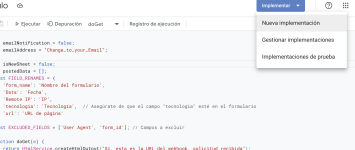
Una vez pegado, le damos a "Implementar" "Nuevo" y ponéis que tenga acceso todos los usuarios. Una vez echo esto os aparece una ventana de google para Aceptar. Después una ventana donde os aparecerá una URL larga, la copias y la pegais dentro del apartado "Webhook" del formulario creado de Elementor. Y ya estaría! Todos los datos de contacto se os quedará guardado en el Sheet.
Espero os ayude a todos! Un saludo!
JavaScript:
let emailNotification = false;
let emailAddress = "Change_to_your_Email";

let isNewSheet = false;
let postedData = [];
const FIELD_RENAMES = {
    'form_name': 'Nómbre del formulario',
    'Data': 'Fecha',
    'Remote IP': 'IP',
    'tecnologia': 'Tecnología',  // Asegúrate de que el campo "tecnologia" esté en el formulario
    'url': 'URL de página'
};
const EXCLUDED_FIELDS = ['User Agent', 'form_id']; // Campos a excluir

function doGet(e) {
    return HtmlService.createHtmlOutput("Sí, esta es la URL del webhook, solicitud recibida");
}

function doPost(e) {
    Logger.log(e.parameter);

    let params = JSON.stringify(e.parameter);
    params = JSON.parse(params);
    postedData = params;

    insertToSheet(params);
    return HtmlService.createHtmlOutput("Solicitud POST recibida");
}

const flattenObject = (ob) => {
    let toReturn = {};
    for (let i in ob) {
        if (!ob.hasOwnProperty(i)) continue;
        if (typeof ob[i] !== 'object') {
            toReturn[i] = ob[i];
            continue;
        }
        let flatObject = flattenObject(ob[i]);
        for (let x in flatObject) {
            if (!flatObject.hasOwnProperty(x)) continue;
            toReturn[i + '.' + x] = flatObject[x];
        }
    }
    return toReturn;
};

const getHeaders = (formSheet, keys) => {
    let headers = [];
    if (!isNewSheet) {
        headers = formSheet.getRange(1, 1, 1, formSheet.getLastColumn()).getValues()[0];
    }
    const newHeaders = keys.filter(h => !headers.includes(h) && !EXCLUDED_FIELDS.includes(h));
    headers = [...headers, ...newHeaders];
    headers = renameFields(headers);
    headers = reorderHeaders(headers); // Reordenar los encabezados
    return headers;
};

// Obtener los valores, dejando "Nombre de formulario", "IP", "Fecha", "Tecnología" y "URL de página" al final
const getValues = (headers, flat) => {
    const values = [];

    // Primero añadimos los campos generales (todos menos los que deben ir al final)
    headers.forEach((h) => {
        if (['Nómbre del formulario', 'Fecha', 'IP', 'Tecnología', 'URL de página'].includes(h)) {
            // Excluimos estos campos para agregarlos después
            return;
        }
        if (h === 'Fecha' && !flat['Fecha']) {
            values.push(new Date().toLocaleDateString("es-ES", { timeZone: "Europe/Madrid" }));
        } else if (h === 'IP') {
            values.push(flat['Remote IP'] || flat['IP'] || 'Sin IP');
        } else {
            values.push(flat[h] || '');
        }
    });

    // Ahora añadimos los campos al final
    ['Nómbre del formulario', 'Fecha', 'IP', 'Tecnología', 'URL de página'].forEach((field) => {
        if (field === 'Fecha' && !flat['Fecha']) {
            values.push(new Date().toLocaleDateString("es-ES", { timeZone: "Europe/Madrid" }));
        } else if (field === 'IP') {
            values.push(flat['Remote IP'] || flat['IP'] || 'Sin IP');
        } else if (field === 'Nómbre del formulario') {
            values.push(flat['form_name'] || 'Nombre no disponible');
        } else {
            values.push(flat[field] || '');
        }
    });

    return values;
};

const insertRowData = (sheet, row, values, bold = false) => {
    const currentRow = sheet.getRange(row, 1, 1, values.length);
    currentRow.setValues([values])
        .setFontWeight(bold ? "bold" : "normal")
        .setHorizontalAlignment("center");
};

const setHeaders = (sheet, values) => insertRowData(sheet, 1, values, true);

const setValues = (sheet, values) => {
    const lastRow = sheet.getLastRow();
    sheet.insertRowAfter(lastRow);
    insertRowData(sheet, lastRow + 1, values);
};

const getFormSheet = (sheetName) => {
    const activeSheet = SpreadsheetApp.getActiveSpreadsheet();
    if (activeSheet.getSheetByName(sheetName) == null) {
        const formSheet = activeSheet.insertSheet();
        formSheet.setName(sheetName);
        isNewSheet = true;
    }
    return activeSheet.getSheetByName(sheetName);
};

const insertToSheet = (data) => {
    const flat = flattenObject(data),
        keys = Object.keys(flat),
        formSheet = getFormSheet(getSheetName(data)),
        headers = getHeaders(formSheet, keys),
        values = getValues(headers, flat);

    setHeaders(formSheet, headers);
    setValues(formSheet, values);

    if (emailNotification) {
        sendNotification(data, getSheetURL());
    }
};

const getSheetName = (data) => {
    return data['e_gs_SheetName'] || ' Trucades CAT';
};

const getSheetURL = () => SpreadsheetApp.getActiveSpreadsheet().getActiveSheet().getUrl();

const renameFields = (headers) => {
    return headers.map(header => FIELD_RENAMES[header] || header);
};

const reorderHeaders = (headers) => {
    // Define el orden de los campos
    const order = ['Nómbre del formulario', 'Fecha', 'IP', 'Tecnología', 'URL de página'];
    const orderedHeaders = order.filter(field => headers.includes(field));
    const remainingHeaders = headers.filter(header => !orderedHeaders.includes(header));
    return [...remainingHeaders, ...orderedHeaders];  // Coloca los campos al final
};

const sendNotification = (data, url) => {
    MailApp.sendEmail(
        emailAddress,
        "Un nuevo formulario de contacto se agregó a Google Sheet",
        `Un nuevo formulario recibido via ${FIELD_RENAMES['form_name'] || 'Formulario'} se añadió a tu Google Sheet: ${url}`,
        { name: 'Automatic Emailer Script' }
    );
};
Una vez pegado, le damos a "Implementar" "Nuevo" y ponéis que tenga acceso todos los usuarios. Una vez echo esto os aparece una ventana de google para Aceptar. Después una ventana donde os aparecerá una URL larga, la copias y la pegais dentro del apartado "Webhook" del formulario creado de Elementor. Y ya estaría! Todos los datos de contacto se os quedará guardado en el Sheet.
Espero os ayude a todos! Un saludo!
Adjuntos